About ExitBlocks
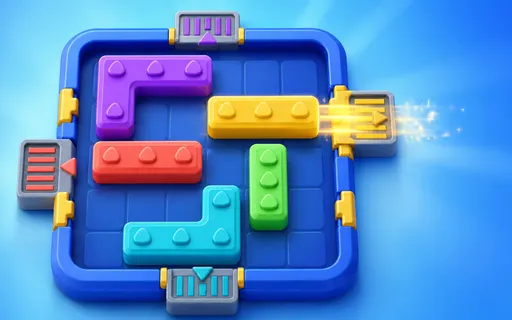
ExitBlocks is a sliding block puzzle game built around color. Every board is crowded with shaped pieces, and each one can only leave through a gate painted to match it. The trick is the traffic jam: pieces get in each other's way, so the order you move them in matters as much as where they go. Levels are compact and a timer keeps you focused, which makes it a neat logic puzzle for a short break. It suits casual players who like planning ahead without a long learning curve, and since there is no download, the next colorful board of blocks loads instantly.
How to play ExitBlocks
Your goal on every stage is to empty the board before the countdown runs out. Drag a block toward the gate that shares its color; when it reaches the right exit, it disappears. Obstacles and other blocks can stand in the way, so think about which pieces to remove first to open space for the rest. If you get stuck on a tricky layout, a booster can help. Clear the last block in time to win and move on to the next stage; let the clock reach zero and the level is lost.
ExitBlocks features
- Color-matched gates that every block must reach.
- Shaped pieces and obstacles that force careful planning.
- A timer on each level.
- Boosters for difficult layouts.
- Portrait and landscape both supported; nothing to buy in the game.
ExitBlocks controls
- Computer: Click a block, keep the button held and drag it toward its gate.
- Phone / tablet: Touch a block and slide it with one finger.
More games like ExitBlocks
Browse more puzzle games on BestGameSpot, or Word Solitaire, Super Bouncy Egg and Sudoku Online next.
ExitBlocks FAQ
What happens when the timer runs out in ExitBlocks?
The level is lost if any blocks remain when the countdown reaches zero, so speed matters as well as planning. Clearing the board first is the only way through.
Is ExitBlocks a brain game?
Yes, it rewards thinking a few moves ahead. Because blocks can trap each other, the main skill is spotting which piece has to leave first so the others have room to slide out.
What are boosters for?
They give you a hand when a layout has you stuck, for example when the blocks are packed so tightly that no obvious first move stands out.
Can I play in portrait mode?
Yes. The game supports both vertical and horizontal screens, so you can hold a phone either way, and dragging pieces with a fingertip works much like dragging with a mouse.