About Arrows
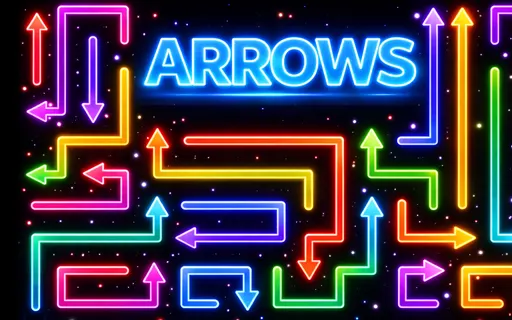
Arrows is a puzzle game about choosing the right order rather than playing fast. The board is packed with curved arrow pieces, each pointing a fixed way, and your job is to send every one of them off the screen. The catch is that a piece blocked by another simply bounces back and the move is gone. Levels start gentle and get harder step by step, so it works as a short brain game for adults and a tidy thinking exercise for kids. The clean, minimal look keeps the focus on reading paths, and the full game costs nothing in your browser.
How to play Arrows
Tap any arrow to launch it. It travels in the direction it points and leaves the board, costing one move. If another piece sits in its way, the two collide, the launched one returns to its spot and that move is wasted. You clear a level by removing every piece before your move limit runs out; use them all up first and you must replay it. The skill is spotting which pieces have a free path right now and which must wait until something else has left.
Arrows features
- Curved arrow pieces that each follow a set path.
- A move limit on every level, so each collision hurts.
- Difficulty that rises gradually from level to level.
- Minimal visuals and simple rules that are quick to learn.
- Either screen orientation, and nothing for sale.
Arrows controls
- Computer: Click a piece to launch it.
- Phone / tablet: Tap a piece to launch it, holding the device upright or sideways.
More games like Arrows
Browse more puzzle games and kids games on BestGameSpot, or Crosswords: Big Collection, Mahjong 3 and Sudoku Online next.
Arrows FAQ
What happens if two arrows collide?
The piece you launched bumps into the one in its way and slides back to where it started. It stays on the board and you lose that move, which leaves less room for error in the rest of the level.
Is Arrows a good game for kids?
It suits kids who like logic puzzles. One tap is the only action, the rules are clear, and early levels are easy, while later ones need real forward planning that older players will enjoy too.
How can I avoid wasting moves in Arrows?
Before tapping, trace the path a piece will take to the edge. Launch the ones with a completely open route first, since removing them often clears the way for pieces that were blocked before.
Does it cost anything?
No download is needed and the game contains no purchases. It fits screens held either way, so a phone in portrait or a laptop in landscape both work.